Wednesday, 27 November 2013

How To Publish WordPress Posts From Microsoft Word 2013‏ ?

How To Publish WordPress Posts From Microsoft Word 2013‏?

WordPress is a very powerful publishing platform, and a very popular one too since more than 45% of blogs are hosted on WordPress. Its major selling point has to be its powerful functionality coupled with an intuitive and user-friend user interface. But if I were to pick out one flaw in WordPress, it would have to be the droll post editor combined with a slow UI that makes editing and saving posts a headache. But what if you could write your blog posts into a powerful word processing software such as Microsoft Word? As it turns out, you can! In this post, we'll show you how to create and publish a blog post directly from MS Word 2013!

One of the biggest problems bloggers face is the lack word-processing capabilities in most (in fact, all) publishing platforms. Platforms like Blogger, WordPress etc provide a spell checker at most, but nothing that would check punctuation, grammar, and sentence coherence. This is where MS Word comes in, because it it excellent in doing those things. And the new line of MS Office 2013 products are quite smart as well, and they continue to amaze me. So what better word processor to use than MS Word 2013?

Publishing a post from MS Word

Step 1: Create new Blog Post

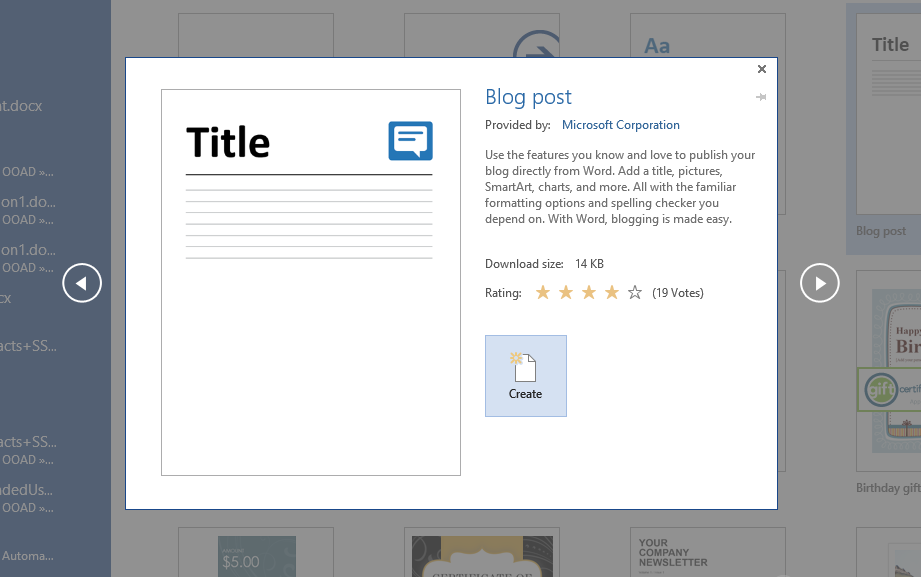
First of all, open MS Word 2013, and create a new Blog Post from the document templates given in the File >> New section.

Create new blog post

Now, click on the Create button on the window that appears next.
Create new blog post

Step 2: Select a platform

You will now see a windows that says Register a Blog Account. Click on the Register Nowbutton, and then select the Blog platform. For the purpose of this tutorial, we're going with WordPress, but feel free to go with another platform if needed.

Choose platform

Click on the Next button to proceed. 

Step 3: Register new account

Now, enter the WordPress blog URL you want to post to, and enter your login credentials (username and password).


If login is successful, you should see the following message.

Success message

Step 4: Create and publish!

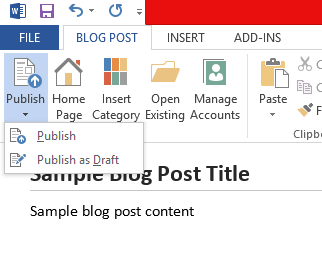
Now, you will see a word editor. Write your blog post in it, and then click on the Publish button on the top left under the Blog Post tab. This should publish the post on your blog. If you'd rather save it as draft first, then pull the drop-down menu, and click on Publish as Draft.
Publish!

Once it has saved, you should see your blog post in your blog post editor.

Simple, right?

It is. And a great way to keep your spellings and grammar in check too. I often use this method of posting, and I would encourage you to do the same as well. And if you run into any problems, be sure to ask a question in the comments section below. Cheers :)

Friday, 13 September 2013

Microsoft Office 2007 Enterprise- Fully Activated


Microsoft Office 2007 (codenamed Office 12) is a version of Microsoft Office, a family of office suites and productivity software for Windows, developed and published by Microsoft. It was released to volume license customers on November 30, 2006 and to retail customers on January 30, 2007, the same respective release dates of Windows Vista. It was preceded by Office 2003 and succeeded by Office 2010.
Office 2007 introduced a new graphical user interface called the Fluent User Interface which uses ribbons and an office start menu instead of menu bars and toolbars. Office 2007 requires Windows XP with Service Pack 2 or higher,Windows Server 2003 with Service Pack 1 or higher, Windows Vista or Windows 7.[7] Office 2007 is the last version of Microsoft Office to support Windows XP Professional x64 Edition.
Office 2007 includes new applications and server-side tools, including Microsoft Groove, a collaboration and communication suite for smaller businesses, which was originally developed by Groove Networks before being acquired by Microsoft in 2005. Also included is Office SharePoint Server 2007, a major revision to the server platform for Office applications, which supports Excel Services, a client-server architecture for supporting Excel workbooks that are shared in real time between multiple machines, and are also viewable and editable through a web page.
With Microsoft FrontPage discontinued, Microsoft SharePoint Designer, which is aimed towards development of SharePoint portals, becomes part of the Office 2007 family. Its designer-oriented counterpart, Microsoft Expression Web, is targeted for general web development. However, neither application has been included in Office 2007 software suites.
Speech and ink components are removed from Office 2007, since speech recognition and handwriting recognition becoming a part of Windows Vista. Handwriting and speech recognition work with Office 2007 only on Windows Vista or Windows XP Tablet PC Edition. However, XP users can use an earlier version of Office to use speech recognition.[10]
According to Forrester Research, as of May 2010, Microsoft Office 2007 is used in 81% of enterprises it surveyed (its sample comprising 115 North American and European enterprise and SMB decision makers).

Product Key : KGFVY-7733B-8WCK9-KTG64-BC7D8


Microsoft Office 2010 Professional Plus + Serial Key


With the release of the Office 2010 Technical Preview, details are finally starting to roll in. Deb Shinder highlights some of the features she thinks might make the new version worth the upgrade.

Microsoft kept the details of its next iteration of Office pretty closely guarded up until the release of the Technical Preview in conjunction with the opening of the Worldwide Partner Conference (WPC) July 13th Now, with the software in the hands of thousands of Microsoft partners, MVPs, and other "selected testers," the cat is out of the bag. I was told by my MVP lead at Microsoft to blog about it to my heart's content.
My first impression was that Office 2010 is going to be to Office 2007 what Windows 7 is to Vista. Although personally I liked both of them, Vista and Office 2007 inspired an inordinate number of complaints from consumers and IT folks alike. Maybe the changes were a little too drastic or maybe it's just that the timing wasn't right. Whatever the reasons, many people skipped the new OS and apps and stuck with Office 2003 on XP.
After using Office 2010 extensively for the last couple of weeks, I'm finding more and more to like about it. One big change is that this version of Office comes in a 64-bit version, so those running a 64-bit OS can take full advantage of 64-bit performance and stability. Keeping in mind that this is beta software and some things could change before the final release, here are the top 10 features that I think will make Office 2010 worth the upgrade.
Download Link :
Serial Key : VTM6G-YPQ9Q-BVYJQ-37RYH-R4X38


Adobe Acrobat XI Pro Free Download


Adobe Acrobat is a set of application software developed by Adobe Systems to view, create, manipulate, print and manage files in Portable Document Format (PDF files). All parts of the set, except Adobe Reader (formerly Acrobat Reader, and also referred to by the program name acroread), are proprietary commercial programs, while the latter is available as freeware and can be downloaded from Adobe's website. Adobe Reader enables users to view and print PDF files but has negligible PDF creation capabilities. Acrobat and Reader are widely used as a method of presenting information with a fixed layout similar to a paper publication.


Adobe has changed the names of the products of the Acrobat set regularly, also dividing, merging, or discontinuing products. Initially, the name "Acrobat" was used as the parent name of a set of products which included Acrobat Reader, Acrobat Exchange and Acrobat Distiller. Over time Acrobat Reader became Adobe Reader; and the name Acrobat Exchange was simplified to Acrobat. Between version 3 and 5, Standard and Professional versions were one product known simply as Adobe Acrobat.
As of March 2013, the current main members of the Adobe Acrobat family are:
Desktop apps
  • Adobe Reader XI (11.0.03)
  • Adobe Acrobat XI (11.0.03
  • Adobe Acrobat XI Standard
  • Adobe Acrobat XI Pro

Mobile apps
  • Adobe Reader for Android (10.6.1)and iOS (10.6)
  • Adobe Reader for Windows Phone 7.5/7.8 (10.1.2) and 8 (10.1.0.0)
  • Adobe CreatePDF for Android and iOS
  • Adobe Reader Touch for Windows 8 Modern UI(1.2)
Online services
  • Adobe FormsCentral
  • Adobe EchoSign
  • Acrobat.com
  • Adobe CreatePDF
  • Adobe ExportPD

Note : This Is a Torrent File . You Should Install uTorrent In Your Computer.